
Sign documents. Stay in control.
Secure electronic signatures for US finance, insurance, and professional services teams. Send, track, and complete documents with audit trails.
Or run it from your AI: connect SignAndGo to ChatGPT or Claude and ask it to send documents, chase signers, and file signed PDFs. See how it works →
Bring your own AI.
Ask Claude or ChatGPT about your envelopes. Get instant status across your workspace, surface stalled signers, draft sends from existing templates, void or remind in a single message, all without leaving the chat.
Native Model Context Protocol (MCP) support. Your AI sees only the envelopes you allow, with separate consent gates for read and write.
File uploads and bulk write operations work best from Claude Desktop, ChatGPT Desktop, or custom MCP clients. Supported environments →
The signing experience your recipients actually enjoy. Clear fields, one-tap signing, a trail on every document.
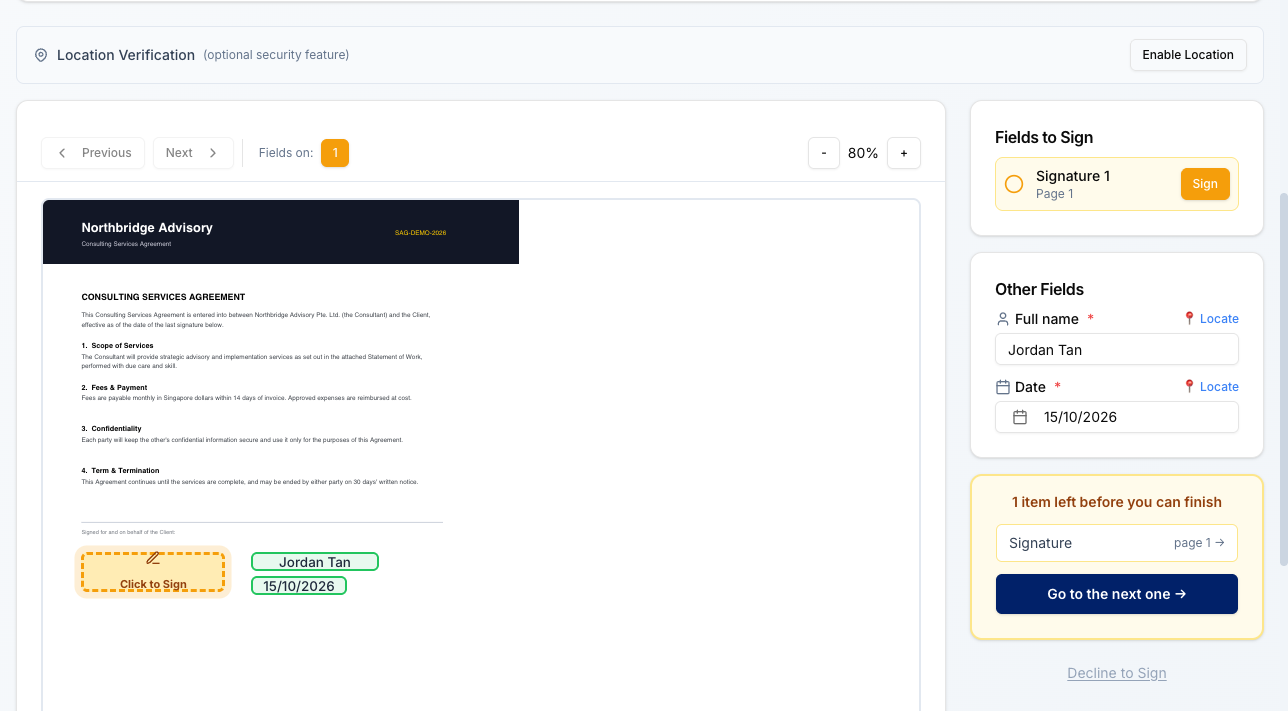
Built for teams who need more than a signature
Scattered approvals slow you down
Create structured signing workflows with sequential or parallel routing. Track every envelope from one dashboard.
Audit gaps create compliance risk
Every action is logged. Download verifiable audit certificates for each completed document.
Shared logins and weak access controls
Assign roles and permissions per user. Separate teams with workspace and subgroup isolation.
More than just signatures
Built-in integrations that save time and reduce errors, with no extra apps or subscriptions needed.
Email Verification
We verify recipient email addresses before you send, catching typos and invalid domains early.
From upload to signed in four steps
Upload or create
Upload your PDF or Word document, or start from a saved template.
Add recipients and fields
Drag signature, date, and text fields onto the document. Assign each field to a recipient.
Send via email
Recipients receive a secure signing link.
Track and download
Monitor progress in real time. Download the signed document and audit certificate when complete.
Everything you need to manage document signing
Edit directly on the document
Double-click any text field to type directly on the PDF. Pre-fill names, dates, and amounts before sending. Your recipients just sign.
Your own templates
Save frequently used documents as templates. Add recipients and fields once, then reuse for every new signing request.
Automatic reminders
Set reminder schedules per envelope. Recipients receive follow-up emails until they sign.
Complete audit trail
Every signature event is recorded with who, when and from where, and each signed document has its own public verification page.
Access controls
Assign admin, sender, or viewer roles. Control who can create, send, and manage documents across your team.
Workspace separation
Isolate data by workspace. Subgroups let you control access within a workspace for different teams.
Developer API
Full REST API with Bearer token authentication, real-time webhooks, and scoped API keys with granular permissions.
Folders and filters
Organize envelopes by status, date, or custom folders. Find any document in seconds.
Document Verification
Every signed document gets a unique verification ID. Anyone can verify authenticity at the SignAndGo verify page. No uploads needed, just the ID.
Drag & Drop Everything
Drag files to upload, drag to reorder documents in bundles, drag recipients to set signing order, and drag fields with snap-to-grid precision.
Witnessed signatures
Add a witness to any signature. They receive their own secure link once the signer has signed, and how they verified identity is recorded in the audit trail.
Approvals and countersigning
Require an internal approval before anyone is asked to sign, or place the approver last so a manager countersigns to complete. Approvers review without placing a signature.
Send to view
Not everything needs a signature. Send a notice or policy for review, get told the moment it is opened, and receive a receipt when it is acknowledged.
In-person signing
Sign on the spot at a counter, on site, or across a desk. Hand over your own device and capture the signature there, with the same audit trail as a remote signature.
Ask signers for documents
Place an upload field and require a license, certificate, or proof of insurance alongside the signature. Every file is virus-scanned before anyone can open it.
Web forms
Publish a link that anyone can fill in and sign, with no envelope to send first. Ideal for onboarding, consent, and intake that arrives on its own schedule.
Verify who is signing
Require a signer to check their government ID with a liveness selfie before they can sign. Set it per document or as a default, and the result is recorded in the audit trail.
Fits the tools you already run
Signed documents should land where the work already happens, not in another inbox to be filed by hand.
Claude and ChatGPT
Ask your own AI assistant about your envelopes, then send, remind, or void without leaving the conversation.
See how it works →Your own systems
A REST API with scoped keys and signed webhooks, so your CRM or portal can raise a signing request and hear back when it completes.
Read the docs →Sign in with Google or Microsoft, and bring your team with you. See all integrations
Security built in, not bolted on
SignAndGo is designed with security at the core. Key controls include:
- Secure signing links: Opaque, high-entropy tokens with expiry and single-use enforcement
- Full audit trail: a record of every signing event
- Workspace isolation: Data access scoped to each workspace, with subgroup controls
- Rate limiting & fraud detection: Abuse protections on authentication and signing endpoints
Infrastructure & Compliance
Built on Google Cloud infrastructure, which holds ISO 27001, 27017, and 27018 certification. SignAndGo's own security practices are aligned to SOC 2 (SignAndGo is not yet independently SOC 2 certified), with AES-256 encryption at rest and in transit and two-factor authentication available on all accounts.
Integrate eSignatures into your workflow
- Full REST API with Bearer token authentication
- Real-time webhooks for envelope status changes
- Python, JavaScript, and cURL code examples
- Scoped API keys with granular permissions
import requests

API_KEY = "sag_..."
BASE = "https://sign.myandgo.ai/api/v1"

# Create and send an envelope
envelope = requests.post(
    f"{BASE}/envelopes",
    headers={"Authorization": f"Bearer {API_KEY}"},
    json={
        "title": "Service Agreement",
        "document_id": "doc_abc123",
        "recipients": [{
            "name": "Jane Smith",
            "email": "jane@example.com",
            "role": "signer"
        }]
    }
)

print(f"Envelope: {envelope.json()['id']}")